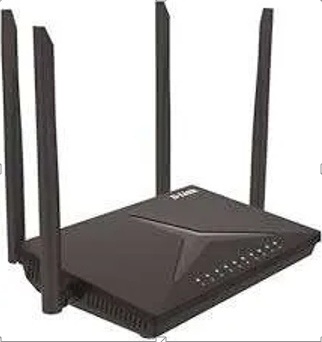
Buying networking equipment requires balancing price against actual needs. Many businesses and homes waste money on either underpowered devices or unnecessary premium features. Smart shopping means matching your router’s capabilities to your coverage area, number of users, and internet speed. This approach delivers reliable connectivity without breaking the bank.
Evaluating the wifi router price in Kenya requires looking beyond the sticker cost to assess the long-term value. A cheaper device might need replacement within a year, whilst a mid-range option could serve you for three to five years. Consider your current internet package speed, the square footage you need to cover, and how many devices connect simultaneously. These factors determine whether you need basic, intermediate, or advanced routing capabilities for your space.
Value Zones That Match Real Usage Patterns
Entry-Level Equipment Serves Light Users: Budget routers handle basic browsing and streaming for small flats or home offices with fewer than ten devices. These units typically cover 800 to 1,200 square feet and work well with internet packages up to 50 Mbps. They lack advanced features but provide stable connections for email, web browsing, and standard definition video streaming.
Mid-Range Models Balance Features and Affordability: Spending a bit more unlocks dual-band technology that separates device traffic across two frequencies. This prevents your neighbour’s streaming from slowing your video calls. Mid-tier routers support 15 to 25 devices, cover 1,500 to 2,500 square feet, and handle internet speeds up to 200 Mbps. They include basic security features and parental controls that protect your network from common threats.
Speed Requirements Often Get Misunderstood
Match Router Capacity to Your Internet Plan: Purchasing a high-performance router makes little sense if your internet package delivers 20 Mbps. The router cannot create speed that your service provider does not supply. Check your current download and upload speeds using a speed test, then select equipment rated for at least 20 per cent above those numbers. This headroom accommodates future package upgrades without requiring new hardware.
Future-Proofing Prevents Premature Replacements: Consider your needs two years from now rather than just today’s requirements. Perhaps you will add security cameras, smart home devices, or upgrade to faster internet service. Buying slightly above your current needs extends the router’s useful life. This approach costs less than replacing undersized equipment when your demands inevitably grow beyond its capabilities.
Coverage Area Determines Hardware Investment
Physical Space Dictates Router Specifications: Single-story homes under 1,500 square feet perform well with basic routers positioned centrally. Multi-storey buildings or spaces exceeding 2,000 square feet need stronger equipment or mesh networking systems that use multiple units. Concrete walls, metal fixtures, and the distance between floors all weaken wireless signals. Measure your space and note construction materials before selecting equipment rated for appropriate coverage.
Strategic Placement Maximises Existing Equipment: You might not need expensive hardware if you optimise your current router’s location. Place it centrally on the main floor, away from thick walls and metal objects. Elevate the device on a shelf rather than hiding it in a cupboard. Sometimes repositioning solves coverage problems that seem to require costly upgrades.
Performance Brackets Reflect Different Priorities
Compare these typical price-to-performance tiers when shopping:
- Basic tier suits light internet users with small spaces, simple browsing needs, and budgets under 5,000 shillings. Expect adequate performance for email and standard browsing but limited capacity for multiple devices or streaming.
- Intermediate tier accommodates growing households and small offices with moderate usage across 10 to 20 devices. Budget between 8,000 and 15,000 shillings for reliable performance, better coverage, and essential security features.
- Premium tier serves demanding environments with heavy streaming, gaming, numerous smart devices, or business operations requiring maximum uptime. Investment exceeds 20,000 shillings but delivers enterprise-grade reliability and advanced management tools.
Hidden Costs Appear After Purchase
Power Consumption Varies Between Models: High-performance routers draw more electricity than basic units. Calculate the annual operating cost by checking the device’s wattage rating and your electricity rates. A router running 24 hours daily consumes significant power over its lifespan. Energy-efficient models reduce operating expenses whilst maintaining adequate performance for most users.
Firmware Support Affects Long-Term Value: Manufacturers release security updates and feature improvements through firmware updates. Budget devices often stop receiving updates within 12 to 18 months, leaving networks vulnerable to emerging threats. Research the manufacturer’s update history before purchasing. Brands with strong support records provide better long-term value despite higher initial costs.
Making Decisions Without Regret
Test Your Current Setup Before Upgrading: Run speed tests at different locations and times to identify actual performance problems. Perhaps your internet package limits speeds rather than your router. Contact your service provider to verify you are receiving promised speeds. Sometimes adjusting quality of service settings or changing wireless channels solves problems without spending money on new equipment.
Prioritise Reliability Over Flashy Features: Marketing materials highlight capabilities you might never use. Focus on build quality, warranty coverage, and user reviews mentioning long-term reliability. A router with fewer features that runs consistently outperforms a feature-rich device prone to crashes and connection drops.
See also: How Immersive Technology Changes Perception
Your Connected Future Starts Here
Smart equipment selection balances immediate needs with future growth. Avoid the cheapest options that fail quickly and the most expensive models loaded with unnecessary capabilities. Research your actual usage patterns, measure your space accurately, and choose devices rated slightly above current requirements. Quality networking equipment pays for itself through years of reliable service and the productivity it enables across your connected devices.